







The most popular PostHog alternatives, compared


Contents
PostHog is your product's context layer. It combines product analytics, web analytics, session replay, feature flags, experiments, error tracking, logs, AI observability, surveys, and more.
All your data lives in one place, tied to the same users and sessions. A data warehouse pulls in the business data that lives elsewhere – Stripe, HubSpot, Postgres, and dozens more – and a CDP pushes it back out to the tools you already use. You can query all of it with SQL, or hand it to an agent from Slack or your editor via the MCP.
As an all-in-one developer platform, it replaces a lot of legacy tools. PostHog is great if you:
- Need quantitative and qualitative insights into user behavior
- Want usage-based pricing with a free tier on every product and no seat fees
- Want one centralized dataset that you and your agents can query from the app, Slack, or your editor via the MCP
If that sounds good, feel free to skip to the install wizard.
If you want to see what else is out there and how PostHog stacks up, keep reading. This guide covers the most popular PostHog alternatives – what they're good at, where they fall short, and who they're actually for.
What does PostHog actually do?
PostHog is a product development platform that includes:
- Product analytics: Funnels, retention, user paths, cohorts, and trends. SQL access for power users.
- Session replay: Watch real user sessions with console logs, network monitoring, and a DOM explorer, or let Replay Vision watch them for you and turn what it finds into events you can chart and alert on.
- Feature flags: Roll out features to specific users or groups without redeploying.
- Experiments: Run multivariate experiments tied directly to your analytics data.
- Error tracking: Monitor exceptions linked to session replays and user behavior.
- Web analytics: Traffic sources, pageviews, UTM tracking, and conversion goals.
- AI observability: Track token usage, latency, costs, errors, and user feedback across your AI pipelines, tied to the user and session that triggered them.
- Data warehouse: Sync Stripe, HubSpot, Postgres, Salesforce, and dozens of other sources next to your product data and query all of it with SQL. 1M rows a month are free.
- CDP: Send data to and from PostHog with a library of integrations and transformations.
- Logs: Capture and search log data alongside your analytics and session replays.
- Workflows: Automate actions and notifications based on product events.
- Surveys: Targeted, multi-step surveys with NPS, CSAT, and PMF templates.
- PostHog AI: Built-in AI tools including an MCP server, natural language querying, AI-powered session summaries, and more.
- MCP, Slack, and CLI: Use everything below from your editor, a Slack thread, or your terminal, so your coding agent can query product data and ship a fix without you copying anything between tabs.
PostHog is built by engineers, for engineers. It's priced per product with a generous free tier – 97% of companies use PostHog for free!
When should you consider a PostHog alternative?
PostHog isn't the right fit for everyone. You might want an alternative if:
- You need a no-code builder for product tours or in-app guides – A coding agent can add tooltips, walkthroughs, and banners to your app with PostHog's product tours skill (
npx @posthog/wizard@latest skill creating-product-tours), but there's no UI for building them. If your CS or product team needs to ship guides without an engineer, Pendo is a good alternative here. - You need multi-touch attribution – PostHog's marketing analytics (beta) imports ad spend and reports cost per conversion, but has no attribution models. Amplitude is stronger for growth and marketing teams who need this.
- You only need one specific tool for a lightweight use case – For example, if you just want cookieless, privacy-friendly traffic stats with a minimal script and no consent banners, a focused tool like Plausible or Fathom might be simpler and cheaper than a full platform.
- You prefer to fully self-host – PostHog can be self-hosted, but it's operationally complex at scale. Tools like Matomo or OpenReplay are designed with self-hosting as the primary deployment model.
Is it hard to deploy PostHog?
Not at all for PostHog Cloud. Our AI setup wizard walks you through installation and configuration in a few minutes – run the command, answer a few questions, and you're tracking events. No credit card required, and you don't need to jump on a sales call. Most teams are up and running within a single session.
If you want to go further, PostHog has SDKs for every major platform and framework, and the docs cover everything from basic pageview tracking to advanced group analytics and feature flag targeting.
Self-hosting is a different story – it's more involved and requires managing your own infrastructure.
For most teams, PostHog Cloud (with US or EU hosting options) is the right choice.
Is PostHog for me?
If one or more of these sounds like you, yes:
- You're an engineer or technical founder – PostHog is built for people who like SQL, MCPs, APIs, and open-source code, and whose agents work from Slack, the CLI, or the editor. You'll feel right at home.
- You're an early-stage startup or solo founder launching your MVP – The free tier covers most early-stage needs, and PostHog for Startups offers $50k in additional credits. You won't need to swap tools as you scale.
- You're building an AI product – PostHog has first-class support for AI observability, error tracking for AI pipelines, and an MCP server that connects your product data to your AI coding tools.
- You don't want to pay upfront – No credit card, no sales call, no minimum contract. You only pay when you exceed the (very generous) free tier.
- You want one source of truth – Instead of stitching together multiple tools (Mixpanel, LaunchDarkly, Sentry, and Hotjar), PostHog gives you the same capabilities and keeps all your product data in one place, and the data warehouse brings your external data in alongside it.
If you're primarily a marketer or a non-technical product manager, or you'd rather do most of your work in a polished UI than through an agent, SQL, or the MCP, PostHog might not be the best fit.
Keep reading to explore the alternatives.


Install PostHog with one command
Paste this into your terminal and make AI do all the work.

Amplitude
- Founded: 2012
- Who it's for: growth and marketing teams who need multi-touch attribution, forecasting, and AI Visibility (AEO), and product teams who want polished analytics with guides, surveys, and experiments in one vendor.
- Who it isn't for: engineering-led teams who want SQL access, open-source code, error tracking, or logs alongside their analytics, or anyone who wants a price before talking to sales on the Growth plan.
What is Amplitude?
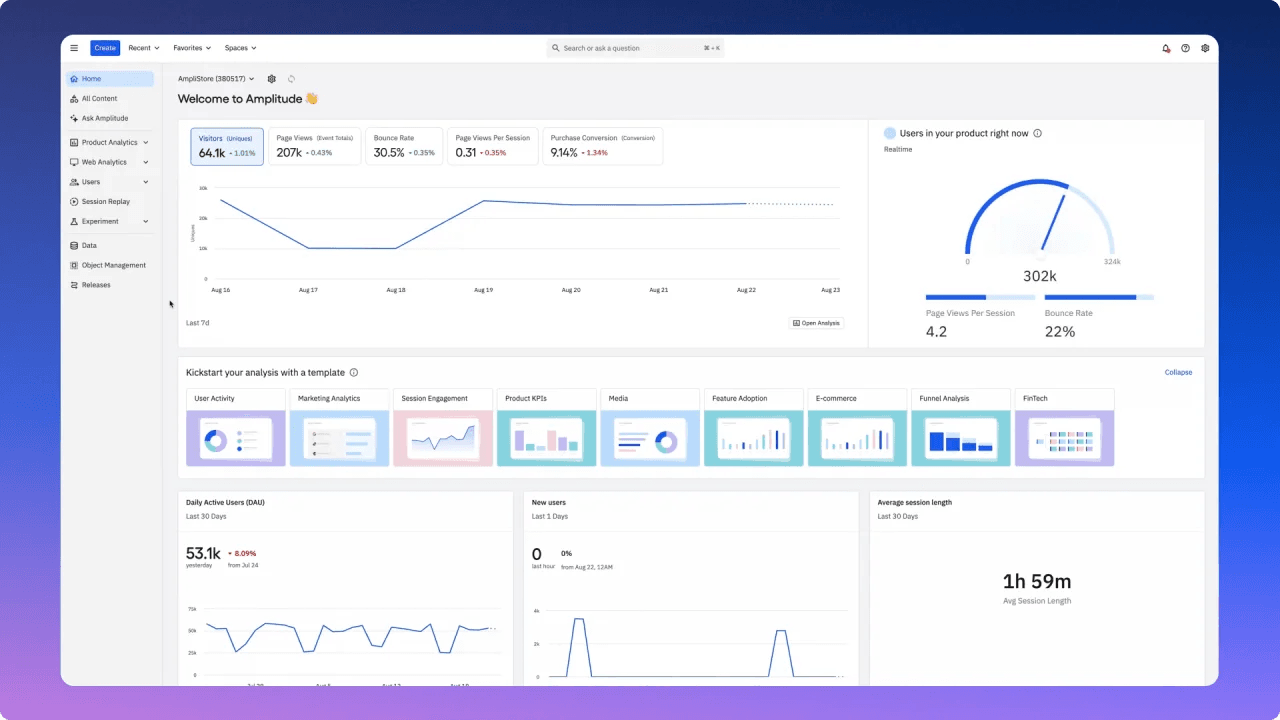
Amplitude is a product analytics platform with a strong focus on behavioral analytics, retention, and growth. It's well-established in the product analytics space and has built a broader platform that includes a CDP (now called Amplitude Activation), a separate A/B testing product (Amplitude Experiment), session replay, and guides and surveys.
Since May 2026 it has also operated Statsig, the experimentation platform OpenAI acquired in 2025.
Amplitude is particularly strong for marketing and growth teams who need multi-touch attribution and predictive analytics.
Key features
- Behavioral analytics: Charts, funnels, user paths, and retention with a polished interface.
- Predictive analytics: Predictions (likelihood to convert or churn) and anomaly detection with forecasting on Growth and Enterprise plans.
- Multi-touch attribution: First-touch through data-driven models, with the full set on Growth and Enterprise.
- Guides and Surveys: Behavior-based in-app tooltips, walkthroughs, NPS surveys, and popups triggered by cohorts and behavioral data.
- Amplitude Activation: The built-in customer data platform for managing user data, identity resolution, and syncing audiences out.
- Amplitude Experiment: Separate A/B testing product with feature flagging (unlimited flags on every plan, one active experiment on Free and Plus).
- Amplitude AI: AI Agents that monitor dashboards and replays, AI Feedback, AI Visibility (how your brand shows up in LLM answers), Agent Analytics for scoring AI agent traces, and an MCP server for querying Amplitude data from Claude, Cursor, and other AI tools.
How does Amplitude compare to PostHog?
What are the main differences & similarities between Amplitude and PostHog?
Marketing vs. engineering focus: Amplitude offers multi-touch attribution, predictive forecasting, and AI Brand Visibility (which tracks how your brand appears in LLMs), which PostHog doesn't have. PostHog is designed for engineers and product teams: both have CDPs and MCP servers, but PostHog adds SQL access, open-source code, and debugging products such as error tracking and logs. It also ships relentlessly, with new features landing every week, which tends to matter to engineering teams who want their tools to keep up.
AI capabilities: Both have AI assistants and MCP servers for querying data from tools like Claude and Cursor. Amplitude's AI Feedback stands out for marketing teams – it aggregates and synthesizes user signals from Zendesk, G2, Reddit, app store reviews, and more into prioritized product insights – and its 2026 Agent Analytics scores AI agent traces for task success.
PostHog's AI observability goes deeper into the pipeline itself: token usage, cost, latency, and errors per generation, tied to the user's session, replay, and any exception it caused. On the replay side, Replay Vision runs AI scanners across many recordings at once and logs each finding as an event, where Amplitude's Session Replay agent summarizes sessions you point it at.
PostHog and Amplitude pricing comparison
| Amplitude | PostHog | |
|---|---|---|
| Free plan | 2M events, 10,000 replays, unlimited flags, 1 active experiment, 1 guide or survey | 1M events, 5,000 web + 2,500 mobile replays, 1M flag requests, 100k errors, 10 GB logs, 1M warehouse rows |
| Paid plans | Plus is pay-as-you-go after 2M events; Growth and Enterprise are custom | No base fee; usage-based per product, with a billing limit you can set per product |
| Public pricing | Free and Plus only; Growth and Enterprise via sales | Yes, with a calculator |
| Startup program | First year of Growth free (under 20 employees, under $10M raised) | $50k in credits for 12 months (under 2 years old, under $5M raised) |
| Self-hosting | None | Free (MIT, open core) |
Bottom line
Amplitude is the better choice for growth and marketing teams who need multi-touch attribution and predictive analytics. PostHog is the better choice for engineering and product teams who want session replay, feature flags, error tracking, LLM observability, and more alongside their core analytics.
Mixpanel
- Founded: 2009
- Who it's for: product managers and growth teams who want polished, approachable analytics with session replay, experiments, and flags in one focused tool, and startups who qualify for its first-year-free program.
- Who it isn't for: teams that need error tracking, surveys, logs, or a data warehouse alongside analytics, or who want to self-host or read the code.
What is Mixpanel?
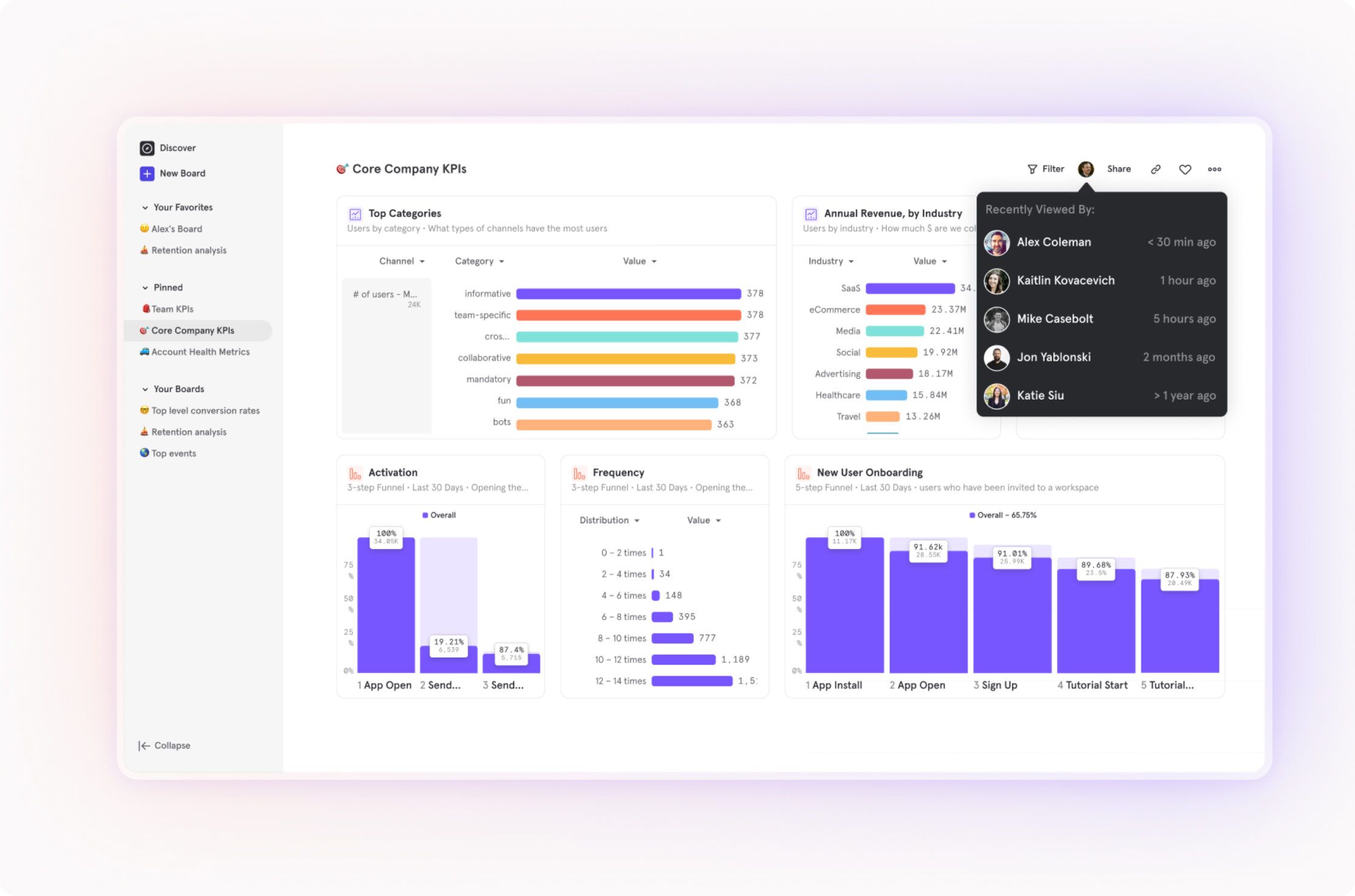
Mixpanel is a platform that has expanded significantly beyond its analytics-only roots. It added session replay in 2024 and heatmaps in 2025, launched Experiments with feature flagging in late 2025 and brought them to its free and Growth plans in 2026, and now has an MCP server, an AI analyst (Mixpanel Agent), and an early-access product for AI agent traces.
Mixpanel is strong on event-based analysis, funnel visualization, and its usage-based pricing model, which makes it popular with startups.
Key features
- Event analytics: Trends, funnels, user paths, and retention analysis.
- Experiments: End-to-end A/B testing with feature flags, cohort targeting, sticky bucketing, and statistical significance across primary, secondary, and guardrail metrics.
- Session replay: Available on all plans (10k replays/month free), integrated directly with funnel and cohort analysis.
- Heatmaps: Click and scroll heatmaps built into the same workflow as analytics and replay.
- Metric trees: Interactive, living frameworks that map relationships between metrics, track goals, and connect experiment results to business outcomes (an Enterprise add-on).
- Warehouse connectors: Import from BigQuery, Snowflake, Redshift, Databricks, and Postgres; a separate Data Pipelines add-on exports back out on Growth and Enterprise.
- Mixpanel Agent: An AI analyst (formerly Spark) that builds reports and cohorts and investigates replays from a plain-English question, plus Agent Intelligence (early access) for AI trace cost, latency, and errors.
How does Mixpanel compare to PostHog?
What are the main differences & similarities between Mixpanel and PostHog?
Scope: Mixpanel and PostHog now overlap more than they used to – both have analytics, session replay, A/B testing, feature flags, and MCP servers. Where PostHog pulls ahead is error tracking, surveys, logs, a CDP, generally available AI observability (Mixpanel's Agent Intelligence is early access), and a data warehouse that syncs Stripe, HubSpot, and Postgres next to your product data. Where Mixpanel stands out: metric trees, and a funnel and path analysis UI that non-technical users might find more approachable than PostHog's.
Developer experience: PostHog is open source, and its MCP server, Slack app, and CLI let engineers and their agents query product data and ship fixes from wherever they work. Mixpanel's MCP server covers querying, but it's closed source and offers less for engineering-led teams who want to inspect the codebase or integrate deeply with their dev tooling.
PostHog and Mixpanel pricing comparison
| Mixpanel | PostHog | |
|---|---|---|
| Free plan | 1M events, 10,000 replays, 10 feature flags, 1,000 experiment users; cohorts can be built but not saved | 1M events, 5,000 web + 2,500 mobile replays, 1M flag requests, 100k errors, 10 GB logs, 1M warehouse rows |
| Paid plans | Growth is pay-as-you-go after the first 1M events, self-serve up to 20M events a month; Enterprise via sales | No base fee; usage-based per product, with a billing limit you can set per product |
| Public pricing | Yes, up to 20M events a month | Yes, with a calculator |
| Startup program | First year free: 1B events, 1M replays, all features (under 5 years old, under $8M raised) | $50k in credits for 12 months (under 2 years old, under $5M raised) |
| Self-hosting | None | Free (MIT, open core) |
Bottom line
Mixpanel is a strong choice for teams who want polished product analytics with session replay, A/B testing, and (on Enterprise) metric trees in one focused tool. Once you also need error tracking, surveys, logs, AI observability, or a data warehouse, the case for PostHog gets significantly stronger.
FullStory
- Founded: 2014
- Who it's for: UX research and customer experience teams who want autocaptured replays with frustration signals, in-app guides, and AI summaries, and who are comfortable with enterprise sales.
- Who it isn't for: engineering teams who want feature flags, experiments, error tracking, or open-source code with their replays, or anyone who wants a public price list.
What is FullStory?
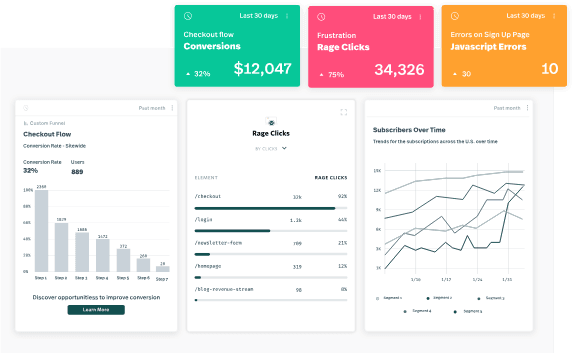
FullStory is a digital experience intelligence platform best known for session replay. It captures every user interaction automatically and lets teams search, filter, and analyze sessions without manual event setup.
FullStory is particularly popular with enterprise UX and customer experience teams who need to diagnose friction, understand user journeys at scale, and share session evidence across product, support, and design.
Key features
- Session replay: Fullcapture, FullStory's autocapture of every user interaction, so you can search and segment sessions retroactively.
- Heatmaps: Click, scroll, and conversion maps.
- Frustration signals: Automatic detection of rage clicks, dead clicks, error clicks, and thrashed cursors.
- Product analytics: Funnels, journeys, retention, and segmentation on top of the captured data.
- Guides and Surveys: No-code product tours, onboarding checklists, banners, smart tips, and in-app NPS surveys triggered on behavioral data, launched in 2026 after FullStory acquired Usetiful and sold as an add-on.
- StoryAI: AI agents (an add-on) that summarize sessions, surface friction points prioritized by conversion impact, and answer behavioral questions in natural language.
How does FullStory compare to PostHog?
What are the main differences & similarities between FullStory and PostHog?
- Session replay depth: FullStory's replay tooling – frustration signals, retroactive search over everything it captured, and StoryAI summaries – is more mature than PostHog's for dedicated UX research.
PostHog's replay is built for product and engineering use, and Replay Vision closes some of the gap: AI scanners review many sessions at once, flag dead ends and frustration, and log each finding as an event you can chart and alert on.
- Feature breadth: PostHog includes feature flags, A/B testing, error tracking, logs, AI observability, and a data warehouse. FullStory is a session replay and analytics tool with guides and surveys bolted on – teams using it typically need other tools to cover the rest of the stack.
| FullStory | PostHog | |
|---|---|---|
| Free plan | 30,000 sessions a month, 10 users, 12 months retention; no StoryAI, mobile, or dashboards | 1M events, 5,000 web + 2,500 mobile replays, 1M flag requests, 100k errors, 10 GB logs, 1M warehouse rows |
| Paid plans | Business, Advanced, and Enterprise, with Guides and Surveys and StoryAI as add-ons | No base fee; usage-based per product, with a billing limit you can set per product |
| Public pricing | No, request pricing | Yes, with a calculator |
| Startup program | None advertised | $50k in credits for 12 months (under 2 years old, under $5M raised) |
| Self-hosting | None | Free (MIT, open core) |
Bottom line
FullStory is the better choice for dedicated UX research teams who need frustration signal detection and in-app guides and are ready for an enterprise sales process once they outgrow the free plan. PostHog is the better choice for product and engineering teams who want session replay as part of a broader platform – with transparent pricing all the way up.
Heap
- Founded: 2013
- Who it's for: non-technical product and marketing teams who want autocapture with retroactive, point-and-click event definition, and who are already evaluating the wider Contentsquare platform.
- Who it isn't for: teams that need session replay on a free or Growth plan, feature flags, experiments, error tracking, or a product whose roadmap isn't tied to a parent company's migration.
What is Heap?
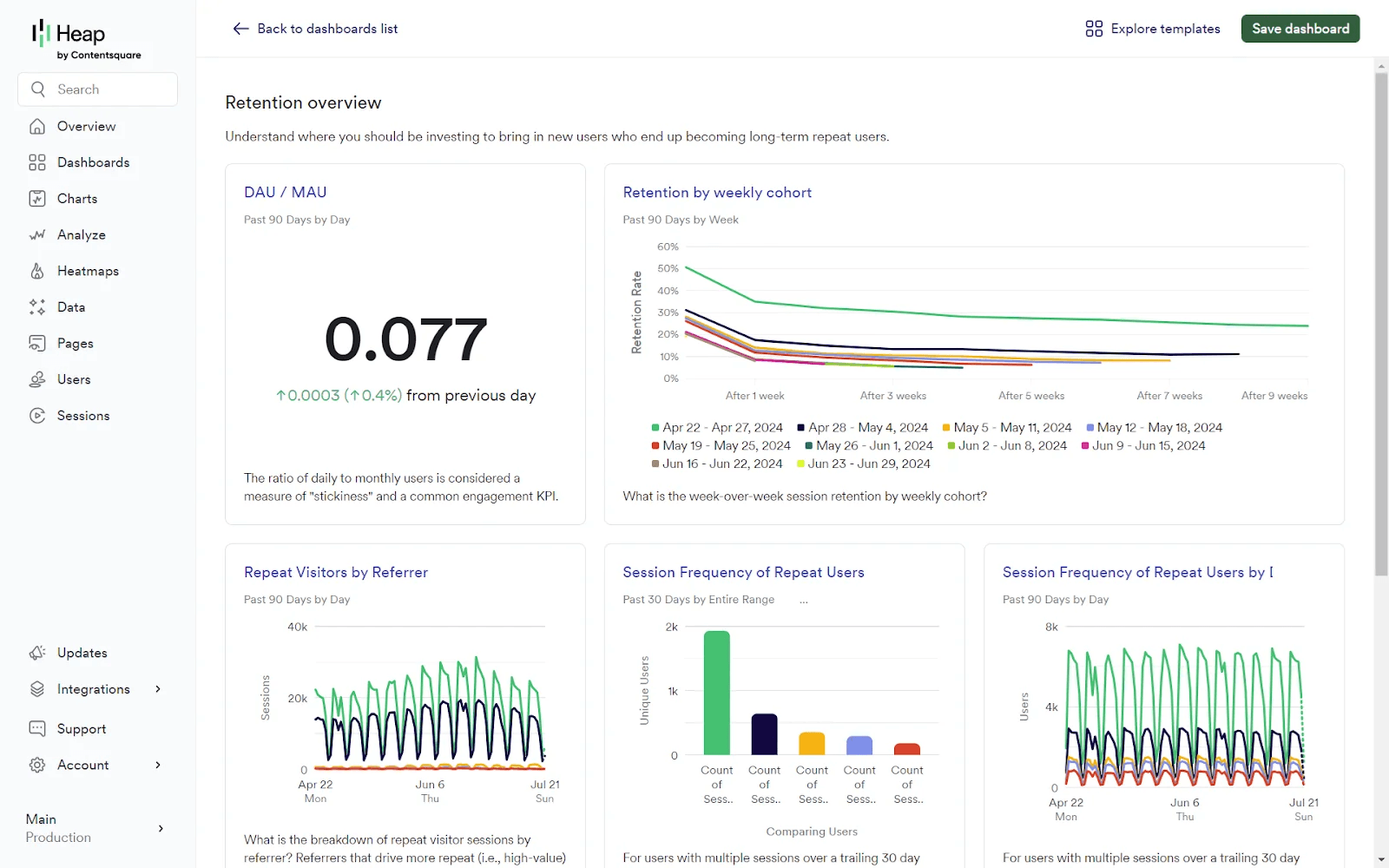
Heap was acquired by Contentsquare in 2023 and is now sold as Contentsquare Product Analytics. Existing Heap accounts and heap.io still work, but Contentsquare says it's unifying Heap, Hotjar, and its own platform into one product, so if you're evaluating Heap today, you're really evaluating Contentsquare.
Heap's key innovation was autocapture combined with retroactive event definition – you capture everything, then define what matters later. This remains genuinely useful for teams who don't know what they'll need to analyze in advance.
Key features
- Autocapture: Capture every user interaction automatically, define events retroactively.
- Visual labeling: Tag events through a visual interface without code.
- Session replay: An add-on on Pro and Premier plans.
- Funnels and paths: Analyze user journeys and drop-off points.
- Sense: Contentsquare's chat-based AI analyst that answers plain-language questions about user behavior, builds charts on demand, and suggests follow-up questions.
- Illuminate: A data science layer that automatically surfaces insights from your behavioral data – including top events influencing conversion and group suggestions to identify high-impact segments – without requiring you to know what to look for in advance.
- Heap Connect: Sync to Redshift, BigQuery, Snowflake, S3, and Databricks (a Pro add-on, included on Premier).
How does Heap compare to PostHog?
What are the main differences & similarities between Heap and PostHog?
Retroactive event definition: Heap's visual labeling is genuinely powerful – you can define and retroactively apply event definitions without code or engineering support. PostHog's autocapture captures everything too, but labeling events requires more technical involvement.
Feature breadth: Heap covers session replay, web analytics, and heatmaps alongside its analytics core – but PostHog goes further with feature flags, experiments, error tracking, surveys, logs, and more. The Contentsquare merger may also eventually give Heap users access to an even broader feature set as the platforms converge.
PostHog and Heap pricing comparison
| Heap | PostHog | |
|---|---|---|
| Free plan | 10,000 sessions a month, 6 months of history, core analytics; no session replay | 1M events, 5,000 web + 2,500 mobile replays, 1M flag requests, 100k errors, 10 GB logs, 1M warehouse rows |
| Paid plans | Growth, Pro, and Premier at custom session pricing; replay, heatmaps, and error analysis are Pro and Premier add-ons | No base fee; usage-based per product, with a billing limit you can set per product |
| Public pricing | No, install the snippet to get an estimate | Yes, with a calculator |
| Startup program | None advertised | $50k in credits for 12 months (under 2 years old, under $5M raised) |
| Self-hosting | None | Free (MIT, open core) |
Bottom line
Heap's UI-assisted experience for retroactive event labeling remains genuinely useful for non-technical teams, but, if you're evaluating it today, it's worth understanding the broader Contentsquare platform and how it fits into your needs.
LogRocket
- Founded: 2016
- Who it's for: front-end engineering and support teams who want replays with console logs, network requests, and Redux state attached to JavaScript errors, and who can budget for a paid plan from day one.
- Who it isn't for: small teams or side projects (there's no free plan), anyone who needs backend error tracking, feature flags, or experiments, or teams that want open-source code.
What is LogRocket?
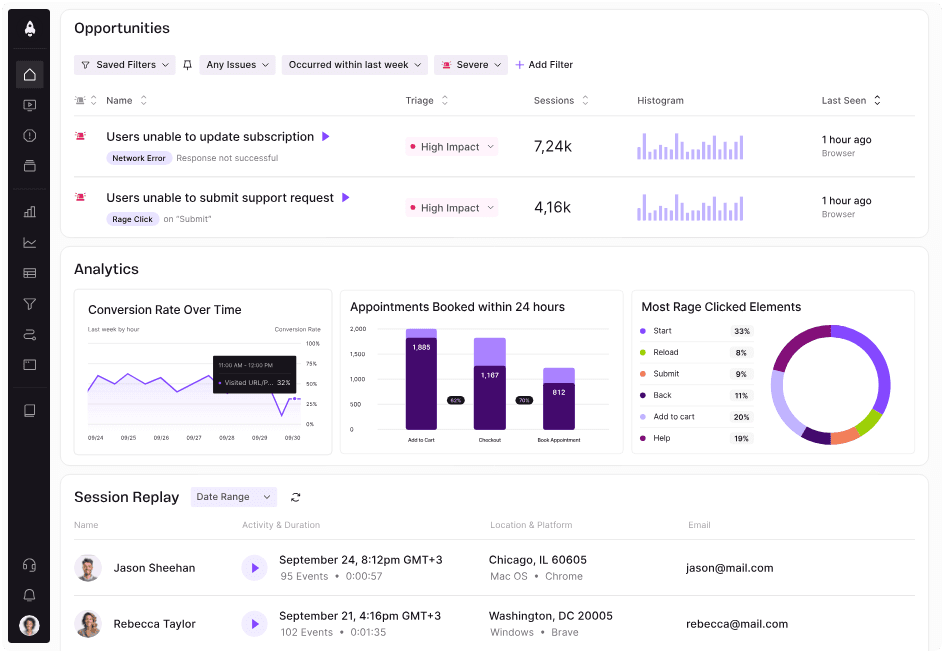
LogRocket positions itself between FullStory and Sentry – it combines session replay with front-end error monitoring and some product analytics.
It's popular with engineering teams who want a developer-focused session replay tool with performance monitoring built in. LogRocket has also added Galileo, an AI layer that surfaces issues and recommendations proactively.
Key features
- Session replay: Full DOM replay with console logs, network requests, and Redux state.
- Front-end monitoring: JavaScript error tracking and performance profiling.
- Heatmaps: Click, rage click, and scroll maps.
- Product analytics: Basic funnels, user paths, and conversion tracking.
- Galileo AI: Session summaries, proactive issue detection, and UX recommendations, on Pro and Enterprise plans.
How does LogRocket compare to PostHog?
What are the main differences & similarities between LogRocket and PostHog?
Session replay focus: LogRocket's replay tooling includes Redux/state management capture and Galileo AI proactive issue detection – features aimed squarely at front-end engineers. PostHog's replay is broader, connecting sessions directly to feature flags, experiments, errors, and funnel analysis, and Replay Vision scans recordings in bulk so you don't have to watch them one at a time.
Product analytics: PostHog's product analytics are significantly deeper – cohorts, retention, paths, SQL access, and group analytics. LogRocket's analytics are basic and supplementary to its replay core.
PostHog and LogRocket pricing comparison
| LogRocket | PostHog | |
|---|---|---|
| Free plan | None (14-day trial, card required) | 1M events, 5,000 web + 2,500 mobile replays, 1M flag requests, 100k errors, 10 GB logs, 1M warehouse rows |
| Paid plans | Core from $176 a month billed annually, priced by session volume; Pro adds Galileo AI; Enterprise custom | No base fee; usage-based per product, with a billing limit you can set per product |
| Public pricing | Yes, a calculator by session volume | Yes, with a calculator |
| Startup program | None advertised | $50k in credits for 12 months (under 2 years old, under $5M raised) |
| Self-hosting | Enterprise plans only | Free (MIT, open core) |
Bottom line
LogRocket is a strong choice for engineering teams who want developer-focused session replay with front-end performance monitoring. PostHog is the better choice if you also need deep product analytics, feature flags, A/B testing, or a single platform for your whole stack.
Sentry
- Founded: 2012
- Who it's for: engineering, DevOps, and SRE teams who need deep stack traces, distributed tracing, profiling, and a mature triage workflow, with SDKs for 100+ platforms including game engines and consoles.
- Who it isn't for: teams who want the user and product context around an error – the replay, the flags, the funnel it broke – or who need product analytics, surveys, or a data warehouse at all. The free plan is also limited to a single seat.
What is Sentry?
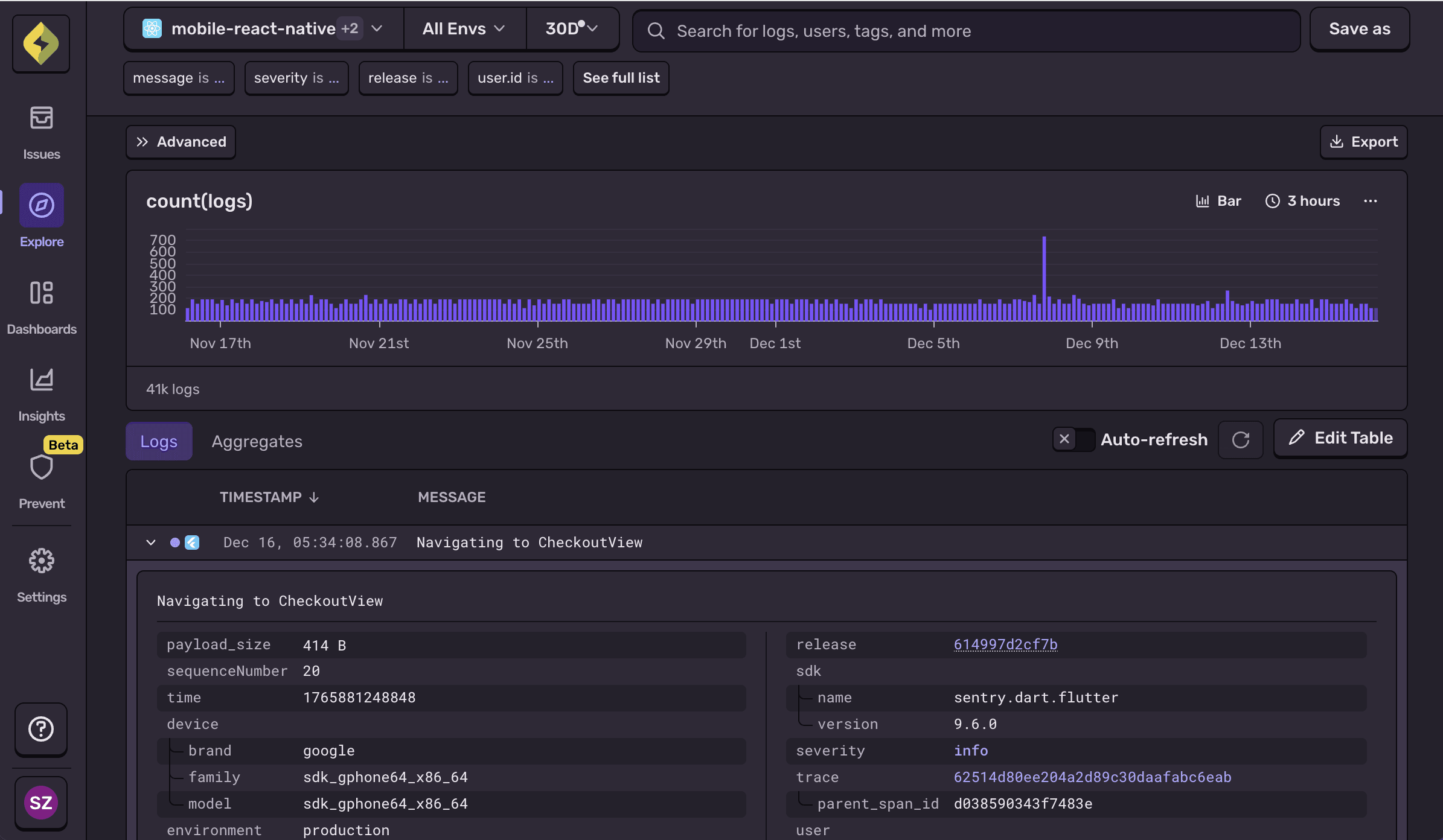
Sentry is the default application monitoring tool for a lot of engineering teams: error and performance monitoring first, with session replay, logs, metrics, uptime and cron monitoring, and AI agent monitoring added around it. Seer, its AI debugging agent, finds root causes and opens fix PRs as a paid add-on.
The main web app is source-available under the Functional Source License (it converts to Apache-2.0 after two years) and free to self-host, and its hosted MCP server is free on every plan.
Key features
- Error tracking: Exception grouping, stack traces with source maps, release health, and issue ownership and assignment.
- Tracing and profiling: Distributed tracing with span-level detail, plus continuous profiling on paid plans.
- Session replay: Replays attached to issues so you can see what happened right before an error.
- Logs and metrics: Both generally available, with 5 GB of each free every month.
- Seer: A paid AI agent ($40 per active contributor per month) that diagnoses issues and proposes fixes.
- Uptime and cron monitoring: Alerts when a check fails or a scheduled job doesn't run.
How does Sentry compare to PostHog?
What are the main differences & similarities between Sentry and PostHog?
Depth vs. context: Sentry focuses on depth: it's tracing, profiling, and SDK coverage (Unreal Engine, Godot, consoles) are more mature than PostHog's, and its triage workflow is built for teams managing many services. PostHog, on the other hand, focuses on context: it ties every error to the session replay, the feature flags the user was in, the logs your server wrote, and who the user is, and Replay Vision can scan every session that hit an error instead of making you watch them one at a time.
Breadth and data: PostHog adds product analytics, feature flags, experiments, surveys, a data warehouse you can query with SQL, and a CDP that moves data in and out. Sentry's data forwarding only covers error events and is a Business-plan feature. Both have free MCP servers, but Sentry's AI agent is a paid add-on while PostHog AI includes 500 credits a month for free.
PostHog and Sentry pricing comparison
| Sentry | PostHog | |
|---|---|---|
| Free plan | 5k errors, 50 replays, 5M spans, 5 GB logs, 1 user | 1M events, 5,000 web + 2,500 mobile replays, 1M flag requests, 100k errors, 10 GB logs, 1M warehouse rows |
| Paid plans | Team $29/month, Business $89/month, plus usage; Seer at $40 per active contributor | No base fee; usage-based per product, with a billing limit you can set per product |
| Public pricing | Yes | Yes, with a calculator |
| Startup program | Up to $5k in credits (under 2 years old, under $5M raised) | $50k in credits for 12 months (under 2 years old, under $5M raised) |
| Self-hosting | Free (FSL, source-available) | Free (MIT, open core) |
Bottom line
Sentry is the better choice for SRE and platform teams who need deep performance tracing, profiling, and broad SDK coverage. PostHog is the better choice if you want errors to arrive with the user context attached and the rest of the platform alongside them. Our in-depth PostHog vs Sentry comparison goes product by product.
Langfuse
- Founded: 2022
- Who it's for: AI engineering teams who want open-source LLM observability with deep prompt management, evals, and datasets, self-hosted or hosted, and don't need anything about the product around the model.
- Who it isn't for: teams who want to connect an LLM trace to the user's session replay, their product analytics, the error it caused, or the flag they were in, or who need analytics, replay, or flags at all.
What is Langfuse?
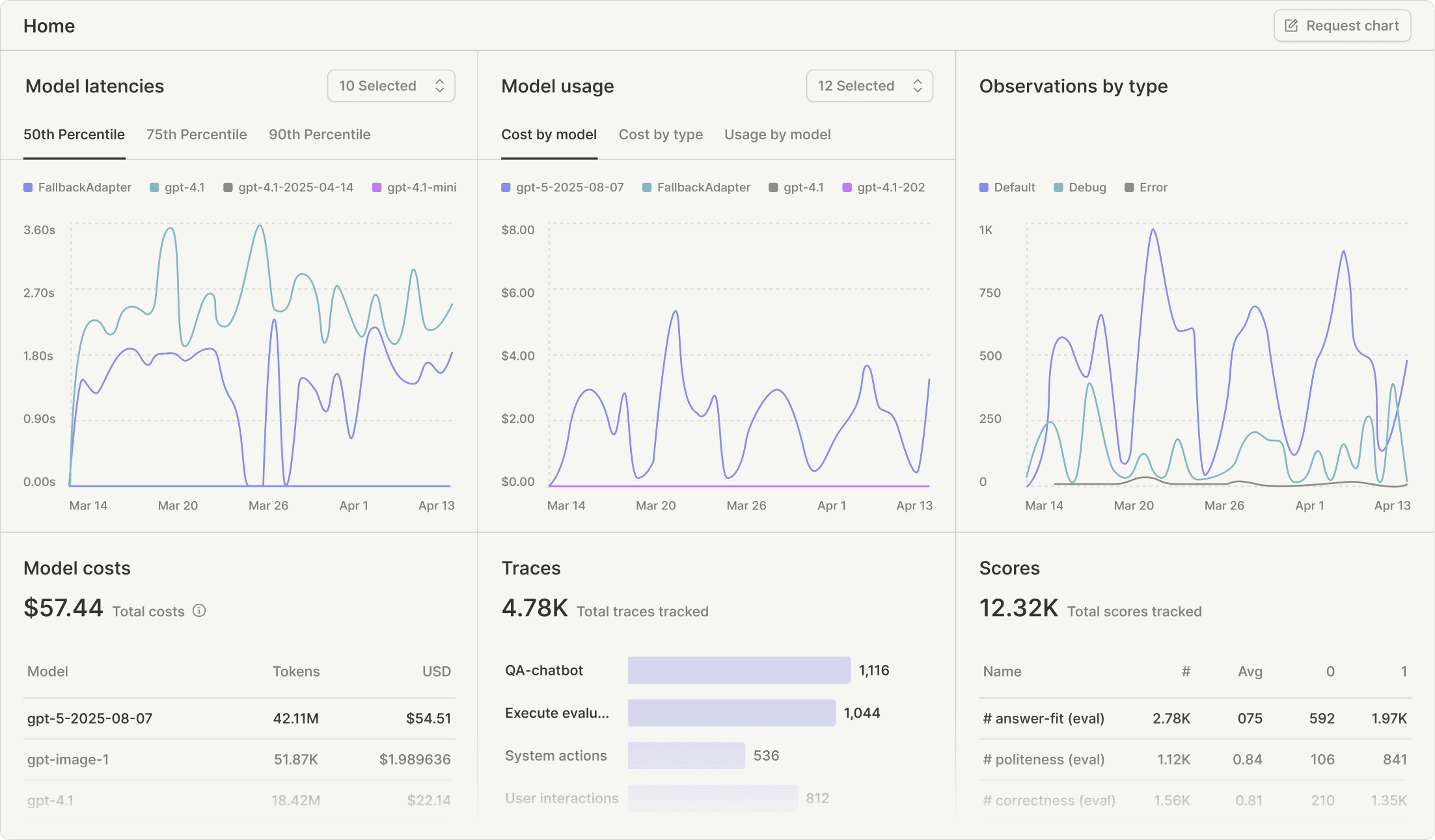
Langfuse is an open-source LLM engineering platform that offers tracing for LLM calls and agents, as well as prompt management with a playground, evaluations, datasets, and dashboards. It joined ClickHouse in January 2026 and continues as a standalone product, MIT-licensed (open core) and free to self-host, with a hosted version in EU, US, Japan, and HIPAA regions.
It's the deepest tool on this page for the model layer itself, but it has nothing for the product around it.
Key features
- Tracing: Nested traces and observations for every LLM call and tool use, with cost, latency, token counts, and conversation-level sessions.
- Prompt management: Versioned prompts with a playground, fetched by your app at runtime.
- Evaluations: LLM-as-a-judge, code-based evals, user feedback scores, and human annotation queues.
- Datasets and experiments: Run prompt or model variants against test sets and compare results.
- MCP server: Native server for prompt management and observation queries from Claude, Cursor, and other clients.
How does Langfuse compare to PostHog?
What are the main differences & similarities between Langfuse and PostHog?
Model layer vs. product layer: Langfuse goes deeper on prompt management, playgrounds, and eval tooling. PostHog's AI observability captures the same generations, traces, cost, latency, and errors, then links each one to the user's session replay, turns failed calls into error tracking issues, and lets you A/B test prompts or models behind a feature flag. If you want both, PostHog ingests Langfuse traces.
Open source and hosting: Both are MIT-licensed open core and free to self-host, and both have MCP servers. Langfuse offers EU, US, Japan, and a dedicated HIPAA region; PostHog offers US and EU, with HIPAA BAAs on paid plans. PostHog's free tier is 100k AI events a month; Langfuse's Hobby plan is 50k units with 30-day retention and two users.
PostHog and Langfuse pricing comparison
| Langfuse | PostHog | |
|---|---|---|
| Free plan | Hobby: 50k units a month, 30-day retention, 2 users; unlimited self-hosted | 1M events, 5,000 web + 2,500 mobile replays, 1M flag requests, 100k errors, 10 GB logs, 1M warehouse rows |
| Paid plans | Core $29/month (100k units, then $8 per 100k), Pro $199/month, Enterprise $2,499/month | No base fee; usage-based per product, with a billing limit you can set per product |
| Public pricing | Yes | Yes, with a calculator |
| Startup program | 50% off Cloud for 12 months (under 5 years old, under $5M raised) | $50k in credits for 12 months (under 2 years old, under $5M raised) |
| Self-hosting | Free (MIT, open core) | Free (MIT, open core) |
Bottom line
Langfuse is the better choice for AI engineering teams who live in prompts, evals, and traces and want them open source. PostHog is the better choice if you want to know what the model did to the user – which sessions a bad answer appeared in, what it cost, and whether the fix worked – alongside the rest of your product data.
Which PostHog alternative should you choose?
Choose...
- Amplitude if you're a growth or marketing team that needs multi-touch attribution, predictive analytics, or AI-powered brand visibility in LLMs. Amplitude has built a genuine marketing platform, while PostHog is more geared towards technical users.
- Mixpanel if you want polished product analytics with session replay, A/B testing, and feature flags but don't need the broader PostHog platform. The free tier is generous and the startup program is excellent.
- FullStory if dedicated UX research is your primary use case. Its replay tooling – frustration signals, StoryAI, Guides & Surveys – is more mature than PostHog's for deep qualitative research, and there's now a free plan, though paid pricing still means a sales call.
- LogRocket if you're a front-end engineering team that wants session replay connected to Redux state, console logs, and network monitoring. Strong for debugging workflows, though you'll need other tools alongside it.
- Heap if autocapture and retroactive event definition appeal to you – it's a solid tool. Just make sure you understand what the full Contentsquare platform looks like before committing.
- Sentry if you're an SRE or platform team that needs deep tracing, profiling, and the broadest SDK coverage, and you're happy to get user context from somewhere else.
- Langfuse if LLM observability is the whole job and you want it open source, with prompt management and evals that go deeper than PostHog's.
Honorable mentions
These tools didn't make the main list but are worth knowing about depending on your use case.
Pendo is the go-to if you need no-code in-app guidance – tooltips, walkthroughs, banners, and onboarding checklists your CS or product team can build without engineering. PostHog has no equivalent. There's a free plan up to 500 monthly active users; paid plans require a sales call.
Hotjar has been folded into Contentsquare: you can't sign up for Hotjar anymore, and its successor is Contentsquare's free Experience Analytics plan, which covers 200k sessions and 10k replays a month, with Growth from $39 a month. Still a good entry point if you just need replay and heatmaps.
Matomo is the open-source (GPL) Google Analytics alternative, free to self-host with a cloud option from around $29 a month. Heatmaps, session recordings, and A/B testing exist as paid plugins. The right pick if web analytics you fully control is the whole requirement.
LaunchDarkly is the enterprise standard for feature management, and since acquiring Highlight.io in 2025 it also ships session replay, errors, logs, and traces. The Developer plan is free with unlimited seats; Foundation is pay-as-you-go. Strong on release control, light on product analytics.
Braintrust is the evals-first AI platform: experiments on datasets with LLM, code, and human scorers, a prompt playground, and production trace logs. It's proprietary (SDKs are open source), with a free Starter plan of 1 GB of processed data and 10k scores, and Pro at $249 a month. Like Langfuse, it has no product analytics, session replay, flags, or error tracking. See our best AI observability tools roundup for the full field.
GrowthBook is an open-source A/B testing and feature flagging platform. If experimentation is your primary need and you want full control over your data and infrastructure, GrowthBook is worth evaluating. PostHog's experiments are more integrated but GrowthBook's statistical engine is more flexible.
VWO and AB Tasty are website experimentation platforms aimed at marketing and CRO teams – visual editors, no-code test creation, personalization, and funnel analysis. The two completed their merger in 2026 under a new parent brand, Wingify, with both products continuing. PostHog's experiments require more technical setup; these tools are built for non-engineers running conversion optimization programs.
Statsig is a feature flagging and experimentation platform popular with engineering teams who want rigorous statistical analysis, warehouse-native data pipelines, and scalable flag infrastructure. OpenAI acquired it in 2025 and Amplitude has operated it since May 2026; it still sells standalone with a free Developer plan. More technically focused than PostHog's experiments, less of a full analytics platform.
Plausible and Fathom are privacy-friendly, cookieless web analytics tools. If all you need is traffic stats – pageviews, referrers, UTMs – without consent banners or complex setup, either is simpler and cheaper than PostHog. Neither has product analytics, session replay, or feature flags.
Is PostHog right for you?
Here's the honest version.
PostHog is the best choice if:
- You want one platform with a full suite of tools, keeping all your product data, your warehouse data, and your user context in one place.
- You're a startup, an engineer, or a technical product team that values SQL access, an MCP server, and open-source code.
- You're building with AI, whether that's shipping an AI product you need to observe or working with agents that need your product's context from Slack, the CLI, or your editor.
- You want to try before you commit – PostHog is fully self-serve with a generous free tier and no sales call required.
It's free to get started with no credit card required. Our AI setup wizard handles configuration in minutes.
Install PostHog with one command
Paste this into your terminal and make AI do all the work.
Frequently asked questions
What does it mean for PostHog to be your product's context layer?
Every alternative on this page is good at one or two slices of what a product generates: Amplitude and Mixpanel at events, FullStory and LogRocket at sessions, Sentry at errors. PostHog stores all of those slices in one place with one model of users and sessions, so a funnel drop-off, the replay of a user falling out of it, the flag they were in, and the error they hit are the same record seen from different sides.
The data warehouse and CDP extends that power to all your business data that lives elsewhere like in Stripe, HubSpot, Postgres, Salesforce. It syncs that data in, and pushes new data back out. As a result, a question like "did the users who hit this error last week churn, and what were they paying us?" turns into one SQL query, and an agent working from Slack, the web app, or your editor via the MCP sees the product as a whole, rather than the events one tool happens to hold.
PostHog says it makes your product "self-driving" – what does that mean?
It means PostHog can dig through your product data, find what's worth fixing, and have agents do the work for you.
It starts with context. A full suite of developer tools – AI Observability, Product Analytics, Session Replay, Feature Flags, Experiments, Error Tracking, Logs, and more – captures everything happening in your product, and a Context Warehouse unifies it into one source agents can read across.
From there, Scouts read across all of it and sort what's worth knowing from what's just noise. What clears the bar becomes a report in your inbox: an agent picks it up, roots out the cause, and opens a PR. You review and merge.
You can steer it from Slack, the web app, or your own editor via the MCP or CLI.
What is the best free PostHog alternative?
For product analytics, Mixpanel has the most comparable free tier to PostHog. For session replay specifically, Microsoft Clarity is free and unlimited (though not open source). For error tracking, Sentry has a free tier.
But PostHog's free tier – 1M analytics events, 5,000 web and 2,500 mobile replays, 1M feature flag requests, and more per product – is the most comprehensive single-platform free tier available.
Can PostHog replace Mixpanel?
Yes, for most teams. PostHog covers everything Mixpanel does (funnels, retention, user paths, cohorts) and adds session replay, feature flags, A/B testing, and error tracking.
See our PostHog vs Mixpanel comparison for details or get started with our managed migration for an easy switch.
Can PostHog replace Amplitude?
For engineering and product teams, yes. For growth and marketing teams who rely on multi-touch attribution and predictive analytics, Amplitude has capabilities PostHog doesn't.
See our PostHog vs Amplitude comparison or get started with our managed migration for an easy switch.
Can PostHog replace FullStory?
For most session replay use cases, yes. FullStory has more advanced heatmaps and frustration signal detection, so dedicated UX research teams may find it more powerful. But PostHog's session replay covers most needs – and comes with analytics, feature flags, and error tracking included.
See our PostHog vs FullStory comparison.
Does PostHog have in-app guides like Pendo?
No. PostHog doesn't have a no-code in-app guide builder for tooltips, walkthroughs, or banners; it retired its product tours tool in 2026 in favor of an agent skill that builds tours directly in your codebase. If no-code in-app guidance is a core requirement, Pendo is the better choice, and it has a free plan up to 500 monthly active users.
PostHog does have surveys for collecting in-app user feedback.
What's the best PostHog alternative for AI observability?
Langfuse if you want open source and deep prompt management; Braintrust if evals are the center of your workflow. Both trace LLM calls with cost, latency, and token usage, and both have MCP servers.
What neither has is a connection to the product around the model: PostHog's AI observability links each generation to the user's session replay, turns failed calls into error tracking issues, and lets you A/B test prompts or models behind a feature flag, with 100k AI events a month free. If you're choosing between them, our best AI observability tools roundup compares nine options.
What's the best PostHog alternative for enterprise?
For enterprise product analytics, Amplitude has the most established enterprise track record. For enterprise session replay, FullStory has deep enterprise integrations and a mature DX Data layer.
PostHog also has an enterprise plan with SSO, SAML, and a dedicated customer success team.
What's the best open-source PostHog alternative?
It depends which part of PostHog you're replacing. Matomo (GPL) for web analytics, OpenReplay for session replay, GrowthBook (MIT, open core) for feature flags and experiments, GlitchTip (MIT) for error tracking, and Plausible's Community Edition (AGPL) for cookieless traffic stats are all free to self-host. None of them covers more than one or two of those, which is the trade-off: PostHog is the only open-source option that puts analytics, replay, flags, experiments, errors, and a data warehouse in one place, and it's free to self-host too.

Subscribe to our newsletter
build mode
Read by 75,000+ founders and builders
We'll share your email with Substack
PostHog is your product's context layer. With a full suite of developer tools – AI observability, product analytics, session replay, feature flags, experiments, error tracking, logs, and more – PostHog ingests and stores all the data agents need to diagnose problems, uncover opportunities, and ship fixes. A data warehouse and CDP tie it all together, unifying that context into one source agents can read across. You can steer it all from Slack, the web app, the desktop (PostHog Desktop), or your own editor via the MCP.